

Best Gaming Headsets of 2026: ArcaLoot’s Picks

It's Friday night, the aircon is doing its best, and the boys are finally all online. We're queuing Ghost of Tsushima Legends, and I'm parked on my ArcaLoot XL pad, sleeve on, gliding through swarms without a single snag on the surface, when Alex starts complaining that he can't hear footsteps anymore. His headset is three years old, the earpads have gone hard as biscuits, and the foam in the headband has given up entirely. "It just sounds muffled," he says. Mate. That's not FortNite patching the audio, that's your gear dying.

Alex's dying headset got me thinking, because I get asked about audio more than almost anything else. I spend half my life obsessing over glide and stitched edges, but if your audio is rubbish, you're playing half a game. Whether it's pinpointing a flanker in a tactical shooter or getting lost in a cinematic score, a good headset is non-negotiable.
So here's my gaming headset comparison for 2026. The brands on this year's list:
- SteelSeries
- Corsair
- Razer
- HyperX
- Logitech
- Beyerdynamic
- Audeze
- Sony
I've tested a few of these myself, mined the boys for opinions, and kept an eye on what the pros are actually wearing. Each pick comes with the reasoning, because a list without a why is just a receipt.
Our headset scores at a glance
These are ArcaLoot editorial scores out of five, balancing sound, comfort, microphone usefulness, connectivity, everyday convenience and value for the player each headset suits. They combine the experiences described here with current manufacturer specifications; they are not lab measurements or customer-review averages. A higher score is a stronger overall recommendation, but the best fit for your platform and room still wins. Close scores are a judgement call, not a measurable performance gap.
Battery figures are manufacturer claims under stated test conditions. Volume, settings and battery age can change what you get, and prices and compatibility should be checked for the exact model in your region.
| Headset | Score / 5 stars | Best fit |
|---|---|---|
| SteelSeries Arctis Nova Pro Wireless | ★ 4.7/5 | Best all-rounder |
| Corsair HS80 RGB Wireless | ★ 4.6/5 | Best value wireless |
| Audeze Maxwell 2 | ★ 4.6/5 | Best sound-focused pick |
| SteelSeries Arctis Nova Pro Omni | ★ 4.5/5 | Best multi-system setup |
| SteelSeries Arctis Nova 5 | ★ 4.5/5 | Best mid-range wireless |
| Logitech G Pro X 2 Lightspeed | ★ 4.5/5 | Best competitive wireless |
| HyperX Cloud III | ★ 4.4/5 | Best wired value |
| Beyerdynamic MMX 330 Pro | ★ 4.4/5 | Best open-back desk setup |
| Razer Kraken V4 Pro | ★ 4.4/5 | Best haptic immersion |
| HyperX Cloud Alpha Wireless | ★ 4.3/5 | Best battery endurance |
| Sony INZONE H9 II | ★ 4.3/5 | Best PS5/shared-room pick |
| Razer BlackShark V2 X | ★ 4.2/5 | Best budget pick |
Best all-rounder: SteelSeries Arctis Nova Pro Wireless
★ ArcaLoot score: 4.7/5 stars · Best all-rounder
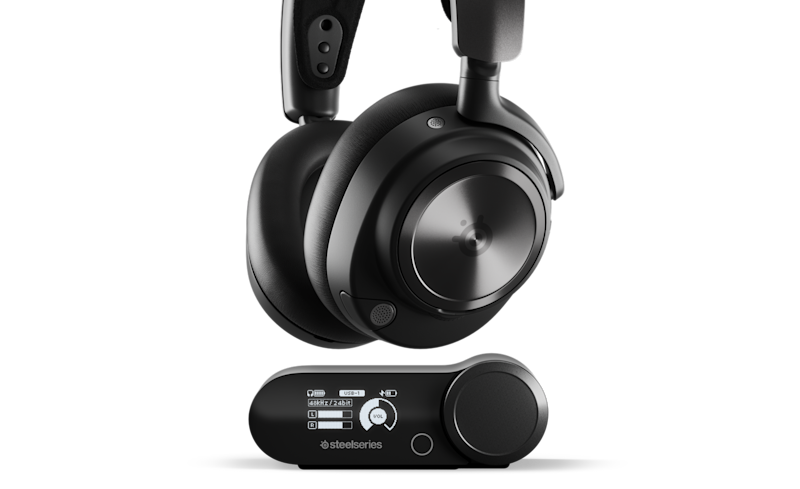
Image: SteelSeries
If you want one headset that does everything well, the SteelSeries Arctis Nova Pro Wireless is the one to beat this year. The reason I rate it is simple: the dual-battery system. One battery runs the headset while the other charges in the base station, so you swap mid-session and never plug in a cable. It's got proper active noise cancelling, which finally matters now that ANC has stopped being a premium-only feature. If you jump between PC and console like I do, it's the whole package. Alex actually ended up picking up this one and he says he's never gonna go back to $30 dollar headsets he's picked out of a bargain bin again.
The appeal goes beyond the battery trick. You can keep two systems connected to the base station and switch the active USB source, while simultaneous Bluetooth lets you bring phone audio into the mix. That is useful if your mates are on one chat service and your game lives somewhere else. ANC adds another reason to consider it for a shared room: you can turn down distractions without simply cranking the volume.
The catch is that you're buying a whole desk setup, not just something to chuck in a bag. The base station needs space, and the price makes more sense if you'll use its switching and controls regularly. Check the version before buying: Xbox USB support requires the Xbox model. For a single PC in a quiet room, the HS80 or Nova 5 is an easier spend. For a busy setup, this is still my overall winner.
Pros
- Hot-swappable batteries keep charging breaks out of your sessions.
- ANC, two connected USB systems and simultaneous Bluetooth cover a versatile setup.
- Base-station controls put everyday audio adjustments within reach.
Cons
- Premium price is harder to justify for one system.
- The base station takes desk space and adds cabling.
- Xbox compatibility depends on buying the correct version.
ArcaLoot verdict: 4.7/5 for the balance of convenience, isolation and flexibility. It loses a little for price and setup complexity, but Alex's bargain-bin retirement makes perfect sense to me.
Specification reference: SteelSeries Arctis Nova Pro Wireless official product information · Platform compatibility guide.
Best value wireless: Corsair HS80 RGB Wireless
★ ArcaLoot score: 4.6/5 stars · Best value wireless
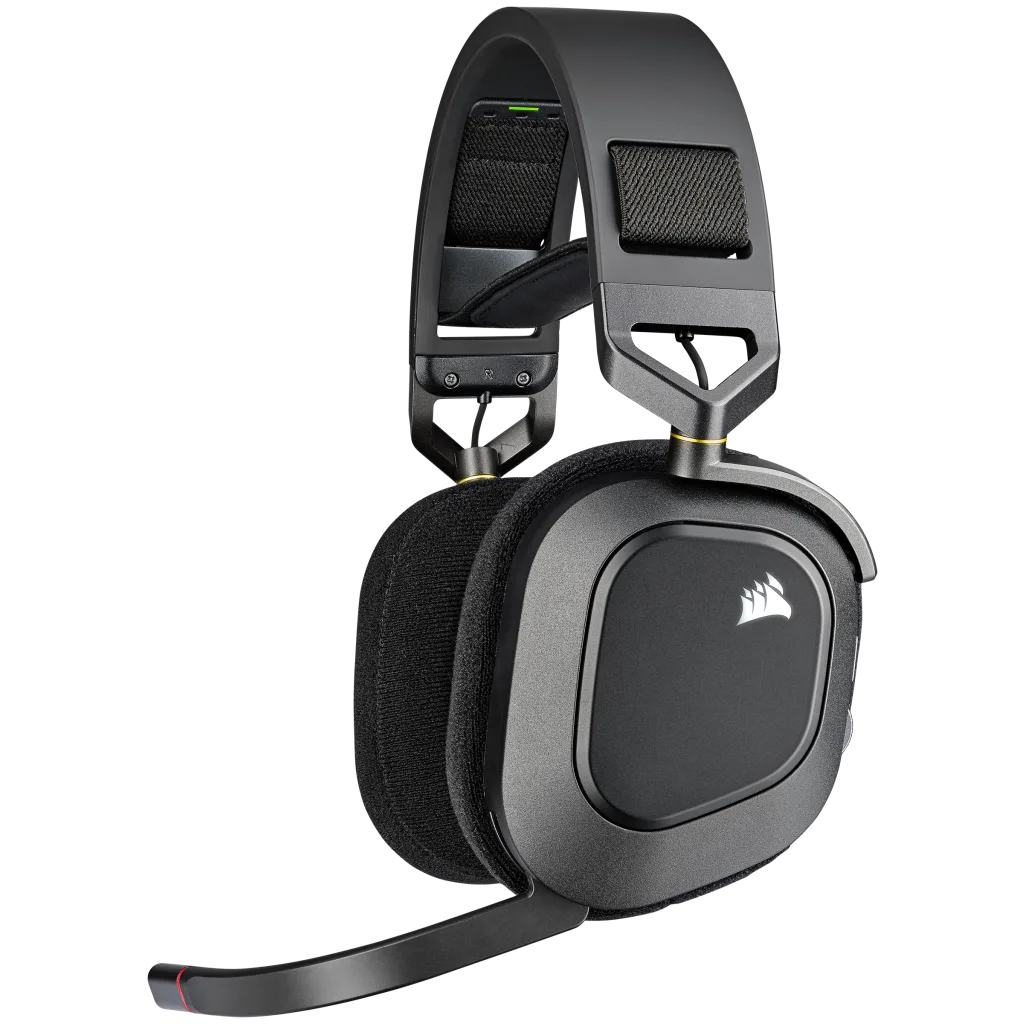
Image: Corsair
Right behind it, and honestly the value king of this whole list, the Corsair HS80 RGB Wireless. I rank it this high for three reasons. First, Dolby Atmos comes included, and it's the most convincing spatial audio I've heard in this price bracket, with proper height channels so you can tell when someone is above you. Second, comfort. The floating headband design spreads the weight so evenly that I've worn it for five-hour sessions and forgotten it was on my head. Third, value. At a good local price, it is a compelling alternative to the premium picks; compare current Australian listings before buying. Battery life is the main weakness, at up to 20 hours, so you'll charge it more often than the endurance leaders. How often depends on your weekly play time. If the Nova Pro is the best headset of 2026, this is the smartest buy HANDS DOWN!
The HS80's everyday conveniences deserve some credit too. The boom mic flips up to mute and has a status light, so there is less chance of broadcasting your entire snack break. The cloth pads and floating headband are a sensible combination for longer sessions. On PC, iCUE gives you EQ and sidetone controls, while the included USB receiver also works with PS4 and PS5. Dolby Atmos is a PC feature, so don't buy it expecting the identical software experience on console.
The original HS80 RGB Wireless is the model here, not the newer HS80 MAX. Its quoted battery life is up to 20 hours, so how often you charge depends on how much you play. This is where it gives ground to the Nova 5 and Cloud Alpha Wireless. The mic is fixed, and Xbox isn't listed among its supported platforms. Still, if you're shopping for a PC or PlayStation setup and the local price is right, comfort and useful features make a convincing case.
Pros
- Floating headband and fabric ear pads suit extended sessions.
- Included PC Dolby Atmos and iCUE audio controls add useful flexibility.
- Flip-to-mute microphone and PC/PlayStation wireless support.
Cons
- Up to 20 hours is short beside newer wireless alternatives.
- Dolby Atmos is PC-only; Xbox is not a listed platform.
- The microphone is not detachable.
ArcaLoot verdict: 4.6/5 as a value-focused PC or PlayStation pick. It earns its place through comfort and practicality, with battery endurance keeping it below the overall winner.
Specification reference: Corsair HS80 RGB Wireless official product information.
Premium multi-system pick: SteelSeries Arctis Nova Pro Omni
★ ArcaLoot score: 4.5/5 stars · Best multi-system setup
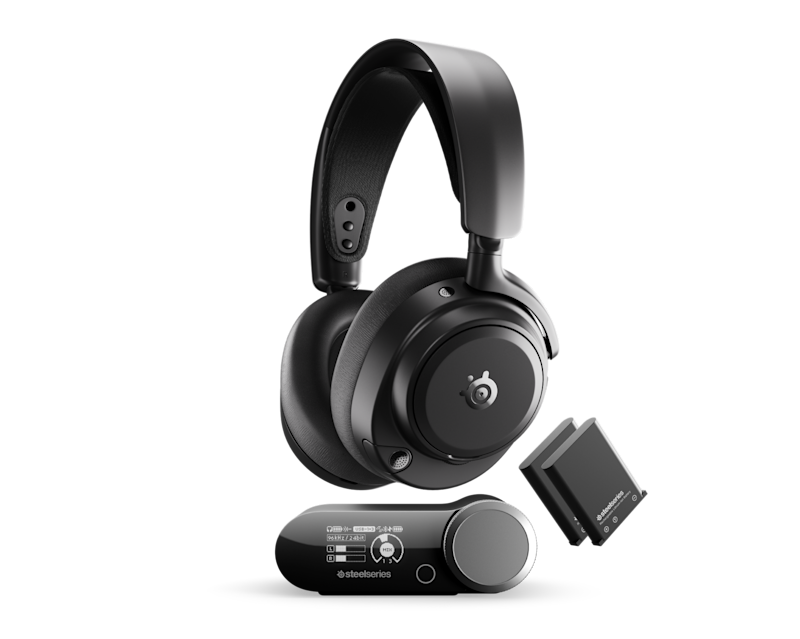
Image: SteelSeries
On the premium end, the SteelSeries Arctis Nova Pro Omni is the multi-system dream. It connects to PC, PlayStation and Xbox at the same time through the base station, and you switch between them with a button press. It's pricey, no argument there, but if your desk is a mess of devices like mine, it replaces all of them at once.
The important distinction is what the GameHub can actually mix. There are three USB connections for your systems, but simultaneous mixing supports up to four sources in the combination of two USB feeds, Bluetooth and line-in. That means console game audio and PC Discord can share your ears without moving a dongle around. It is more capable than simply switching between devices, but it isn't three simultaneous USB game feeds.
You also get ANC, swappable batteries and onboard microphone noise rejection, with source and EQ controls at the hub. My buying advice is to count the problems it solves at your desk. If you regularly juggle consoles, PC chat and your phone, the convenience is the point. If you only launch games from one machine, much of that premium will sit unused. A simpler headset leaves more money for the rest of your setup.
Pros
- Keeps multiple systems connected and mixes two USB feeds with Bluetooth and line-in.
- Swappable batteries avoid a cable hanging off your head mid-session.
- ANC and hub controls suit a busy shared gaming space.
Cons
- The premium is difficult to justify for a single device.
- Simultaneous mixing is limited to two USB sources.
- More sources and settings mean more setup work and desk cabling.
ArcaLoot verdict: 4.5/5 overall, with an especially strong case for people who actually use its multi-system features. It is a specialist convenience buy rather than the automatic upgrade for everyone.
Specification reference: SteelSeries Arctis Nova Pro Omni official product information.
Best budget pick: Razer BlackShark V2 X
★ ArcaLoot score: 4.2/5 stars · Best budget pick
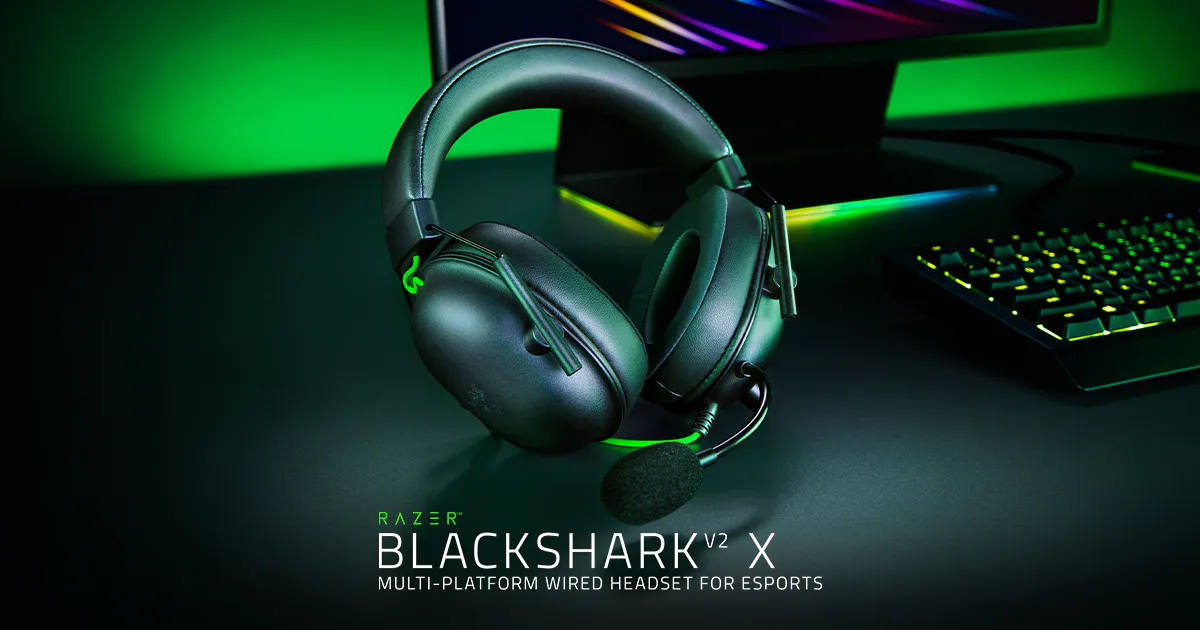
Image: Razer
The Razer BlackShark V2 X remains my top budget shout, and the rationale is weight. At 240 grams, it's lighter than headsets three times the price, which matters more than most people realise for long sessions. The 50mm TriForce drivers separate the bass from the mids and highs, so footsteps don't get buried under gunfire. It runs off a plain 3.5mm jack, so it works on everything you own. The cable isn't detachable, so treat it kindly, but for the price it's absurd value.
At the budget end, simplicity is a feature. The analogue version plugs into a compatible 3.5mm headset socket or controller, so there is no battery percentage to babysit and no wireless dongle to lose. Its closed earcups provide passive isolation, and the bendable cardioid mic lets you position it near your mouth. That makes it a sensible starter headset, spare for a second setup, or option for someone who just wants to join the boys and play.
Keep the expectations sensible. Passive isolation depends on the ear-pad seal; it isn't active noise cancelling. The attached cable and fixed microphone are less flexible if you damage something or want to use it as everyday headphones. Also check that your computer has a combined headset socket or the right splitter for mic input. Razer's surround software has platform requirements, while the basic stereo connection is the feature doing the heavy lifting here.
Pros
- Light 240g design keeps the budget option easy to wear.
- 3.5mm connection needs no charging and suits compatible controllers.
- Bendable microphone and closed earcups cover the gaming essentials.
Cons
- Attached cable and microphone limit replacement flexibility.
- Passive isolation does not provide ANC.
- Older PCs may need a splitter; software surround is platform-dependent.
ArcaLoot verdict: 4.2/5 for a straightforward budget headset. You give up premium conveniences, but there is plenty of sense in spending modestly on the essentials.
Specification reference: Razer BlackShark V2 X official product information.
Wired value: HyperX Cloud III
★ ArcaLoot score: 4.4/5 stars · Best wired value
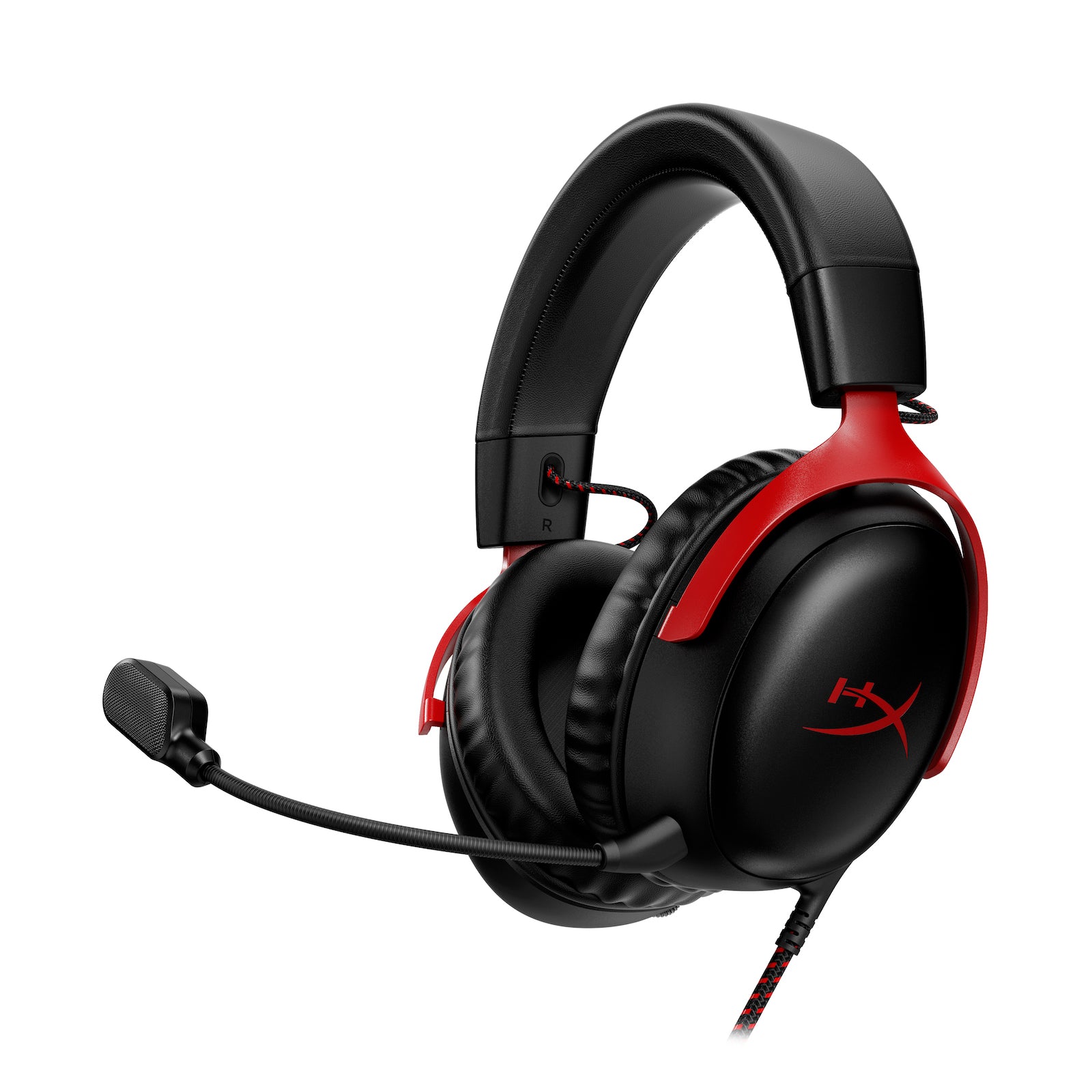
Image: HyperX
Another one that refuses to die is the HyperX Cloud III. This is the wired king of value in 2026. The angled 53mm drivers are tuned for gaming, and the supplied dongle and adapter give you USB-C, USB-A and 3.5mm connection options, so it doesn't care what you plug it into. If Alex had asked me before his headband foam turned to dust, this is what I'd have told him to buy.
This is the wired Cloud III, and that distinction matters when you're comparing listings. You get a detachable 10mm microphone with a mute indicator, memory-foam pads, and an aluminium frame. The supplied USB dongle and adapter let you use USB-C or USB-A, while 3.5mm handles compatible controllers and devices. The broad connection options are a big part of its appeal: one headset can follow you between setups without a battery becoming another job.
I would buy it for the reliable daily routine, not a promise that a bigger driver automatically makes you better at games. The 53mm drivers are angled, but positioning still depends on the game's audio and your settings. Wired also means the cable can catch on your chair or cross your mouse space, so route it properly. If you stay at a desk and don't need wireless freedom, those compromises are easy to live with. Alex could have saved himself a lot of muffled callouts here.
Pros
- 3.5mm, USB-C and USB-A options support a broad range of devices.
- Detachable mic with mute indicator makes comms management easier.
- Memory foam and an aluminium frame support everyday use.
Cons
- A cable needs managing around your chair and mouse space.
- No wireless freedom or active noise cancellation.
- Driver size alone does not guarantee better positional accuracy.
ArcaLoot verdict: 4.4/5 for wired value and versatility. A strong pick for players who want a dependable headset and are happy to manage one cable.
Specification reference: HyperX Cloud III official product information.
Mid-range pick: SteelSeries Arctis Nova 5
★ ArcaLoot score: 4.5/5 stars · Best mid-range wireless
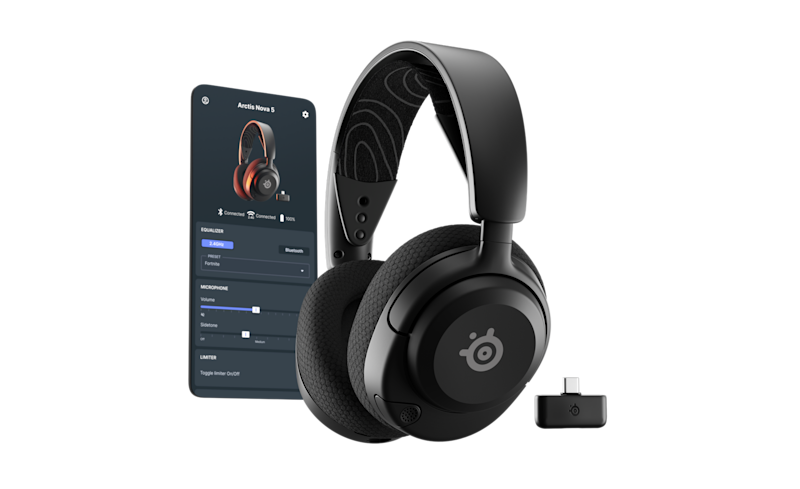
Image: SteelSeries
The mid-range is where the most interesting stuff is happening this year. The SteelSeries Arctis Nova 5 is the one I recommend most often, and the reason is weight plus battery. It's about 265 grams on the suspension headband, it runs roughly 50 hours over 2.4GHz wireless, and there's a fast charge that gets you six hours back in fifteen minutes. That has saved more than one session in this house.
The Companion app is the feature that makes this more interesting than a battery-life number. It offers game-specific presets you can select from your phone, which is handy on console when you don't want to involve a PC just to change an EQ. Treat a footsteps preset as a starting point: compare it with the game's own headphone mode and keep the one that helps you read the action without making everything sound harsh.
Quick-Switch moves between 2.4GHz and Bluetooth, rather than mixing both at once like the Nova Pro Wireless. That is fine for taking a call between rounds, but less useful if you want phone chat and game audio together. Check the variant for console support, particularly if you own an Xbox. For someone who wants a lighter, simpler wireless setup and useful tuning options, the Nova 5 is the sensible middle ground before spending on a base station.
Pros
- Long quoted battery life reduces charging chores.
- Companion app makes game presets accessible from your phone.
- Quick-Switch supports gaming over 2.4GHz and Bluetooth use between sessions.
Cons
- Switches between wireless modes instead of mixing their audio.
- Console compatibility varies by Nova 5 model.
- Presets still need checking against your own games and preferences.
ArcaLoot verdict: 4.5/5 for mid-range practicality. It gets close to the premium experience where it matters most for a straightforward wireless setup.
Specification reference: SteelSeries Arctis Nova 5 official product information.
Battery life: HyperX Cloud Alpha Wireless
★ ArcaLoot score: 4.3/5 stars · Best battery endurance

Image: HyperX
Then there's the HyperX Cloud Alpha Wireless. If you're the type who constantly forgets to plug your gear in at night (guilty), this thing is a lifesaver. The battery is legendary, we're talking weeks between charges. Same sturdy aluminium frame the Cloud line has always had.
HyperX quotes up to 300 hours at its stated test volume, which gives the battery claim some useful context. Real endurance changes with usage and ageing, but charging less often is the whole reason to shortlist it. You also get dual-chamber 50mm drivers, a detachable microphone with a mute-status light, and onboard volume and mic-monitoring controls. The aluminium frame and padded design keep the package focused on the familiar Cloud formula.
The compromise is connectivity. HyperX lists PC as the supported platform for this original Cloud Alpha Wireless, and it relies on its USB wireless adapter. It isn't the same product as the wired Cloud Alpha or the newer Alpha 2 Wireless. If you need phone Bluetooth or a guaranteed console headset, shop elsewhere. For a PC player who keeps forgetting the charger, though, spending on endurance rather than extra connection modes is a perfectly reasonable trade.
Pros
- Up to 300-hour manufacturer battery rating is the headline advantage.
- Detachable mic, mute light and onboard monitoring controls.
- Aluminium frame and memory-foam cushions suit a familiar daily setup.
Cons
- PC is the officially listed platform for this model.
- No Bluetooth mode for your phone.
- USB-adapter dependence makes it less versatile than multi-connection rivals.
ArcaLoot verdict: 4.3/5 overall, with battery endurance as its standout strength. It scores lower on flexibility, but forgotten charging nights are exactly the problem it is built to solve.
Specification reference: HyperX Cloud Alpha Wireless official product information.
Competitive play: Logitech G Pro X 2 Lightspeed
★ ArcaLoot score: 4.5/5 stars · Best competitive wireless
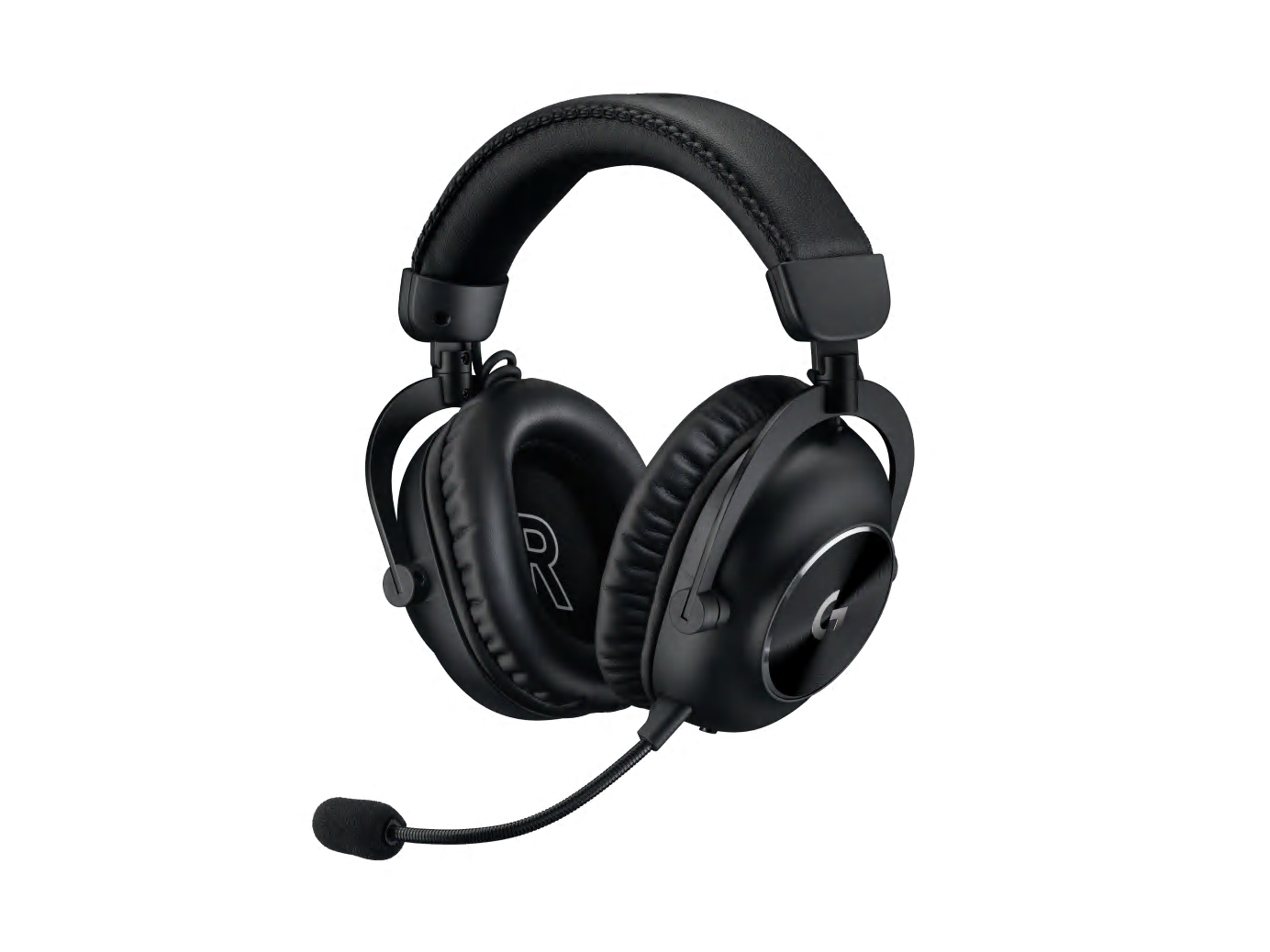
Image: Logitech G
This is my territory. When I'm playing Valorant or Counter-Strike 2, I don't care about cinematic bass, I want to hear the exact millisecond a footstep hits a metal floor. Jenny has been running the Logitech G Pro X 2 Lightspeed since last year and it's still the competitive benchmark. The reasoning: a dedicated LIGHTSPEED wireless connection for responsive gaming audio, graphene drivers that stay clean when five sounds stack at once, and the Blue VO!CE mic that makes her sound like she's standing next to me rather than talking through a radio. I'm still a bit jealous of it.
Beyond Jenny's endorsement, the practical case is a tidy one: 50mm graphene drivers, up to 50 hours of quoted battery life, and LIGHTSPEED, Bluetooth and 3.5mm connection options. The supplied leatherette and velour pad choices give you another way to tune the fit. That matters more than a fancy material name if one set gets warm or presses against your glasses during a long ranked session.
The detachable boom mic and Blue VO!CE processing are useful tools for PC comms, but they don't replace good microphone placement. Keep it close enough to catch your voice without sitting in the path of every breath. For shooters, I would start with a restrained EQ and the game's own positional audio before piling on surround effects. It is a premium spend if you only play casually, and I wouldn't buy it on a universal 'lowest latency' claim. Connection mode and test method matter.
Pros
- LIGHTSPEED wireless plus Bluetooth and 3.5mm give flexible connection options.
- Up to 50-hour quoted endurance covers a substantial run of sessions.
- Detachable boom mic and leatherette/velour pad options add practical flexibility.
Cons
- Premium pricing may be overkill for occasional gaming.
- PC software features do not imply the same experience on every platform.
- Positional performance still depends on the game and audio settings.
ArcaLoot verdict: 4.5/5 for a competitive wireless setup. Comfort choices and useful connections give it substance beyond the esports branding.
Specification reference: Logitech G Pro X 2 Lightspeed official product information.
Open-back soundstage: Beyerdynamic MMX 330 Pro
★ ArcaLoot score: 4.4/5 stars · Best open-back desk setup
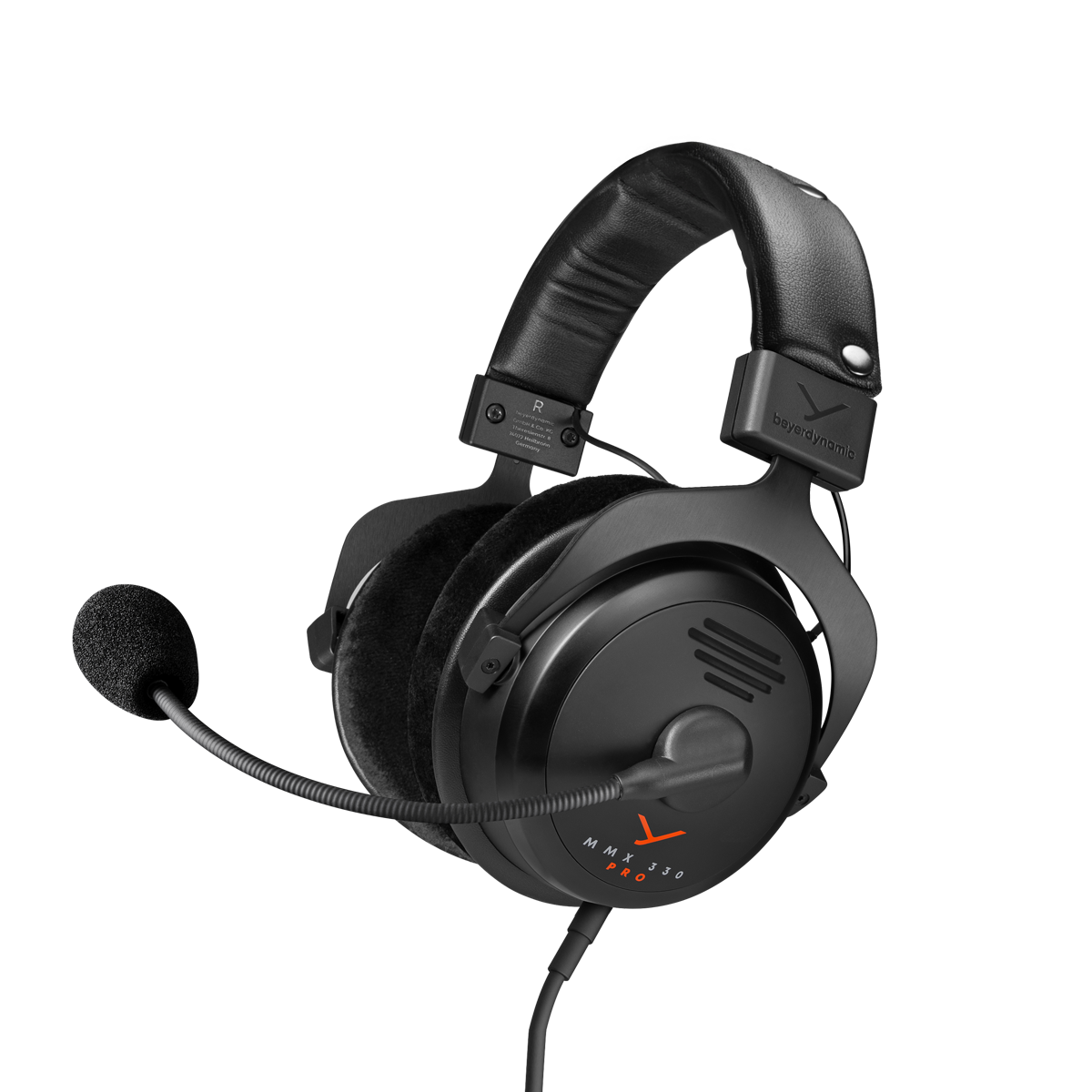
Image: Beyerdynamic
On the wired side, the Beyerdynamic MMX 330 Pro is still my pick for pure soundstage. Open-back, so sound leaks in and out, but the positional accuracy is massive. Pair it with a high-refresh monitor and a low-friction esports mousepad and it almost feels like cheating.
The open-back design is the buying decision here. It lets outside sound reach you and your audio escape into the room, so the right home for it is a quiet desk. That trade can be attractive if you want an airy presentation and dislike feeling sealed away from everything. The velour pads, 318g weight without the cable, and replaceable pads, headband and cable also make this a headset worth considering for the long haul.
The boom mic gives you a complete gaming setup without buying separate headphones and a desk microphone. Its analogue connections work with the appropriate PC sockets or supplied console adapter, with no battery to charge. But I would skip it for a living room with a television running beside you, or if you're trying not to disturb someone nearby. Better equipment can help you notice cues; it cannot manufacture footsteps that the game hasn't made audible.
Pros
- Open-back presentation suits a quiet room and players who prefer less isolation.
- Replaceable pads, headband and cable support long-term ownership.
- Integrated boom mic and analogue connection avoid battery management.
Cons
- Sound leaks out and room noise leaks in.
- A wired desk setup requires cable management.
- Poor fit for noisy shared spaces or listeners beside you.
ArcaLoot verdict: 4.4/5 as a specialist open-back gaming headset. Excellent fit for the right room, with a clear penalty for how limited that room choice can be.
Specification reference: Beyerdynamic MMX 330 Pro official product information.
Planar detail: Audeze Maxwell 2
★ ArcaLoot score: 4.6/5 stars · Best sound-focused pick
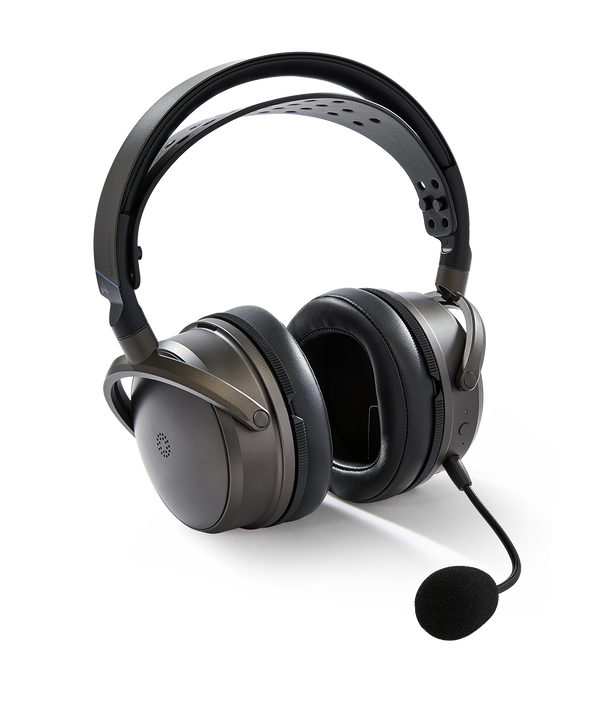
Image: Audeze
And if you prefer wireless with no compromises, the Audeze Maxwell 2 is the "if you know, you know" choice. Planar magnetic drivers, which is fancy talk for insane detail, plus around 80 hours of battery. They're heavy because of the tech inside, but you'll hear things in games you literally never noticed before. This in my humble and totally not the most expert opinion, is the audiophiles number one headphone of choice. If you wanted to play a game where you needed to hear a pin drop - this is the one to buy!
The case for spending big is its 90mm planar drivers and a package that works for gaming and music. Audeze quotes over 80 hours of wireless playback under specified conditions, with USB-C, 3.5mm and Bluetooth available alongside the gaming dongle. The detachable boom microphone and noise-removal processing cover squad chat too. My take: it belongs on the shortlist when sound is the main reason you're upgrading, rather than RGB or a lighter headset.
The very real catch is 560g. That is a lot to wear, especially after a workday, so try the fit if you can. Also choose the PlayStation or Xbox version to match your setup; platform-specific spatial features differ. This is the standard Maxwell 2, separate from the Maxwell 2 ANC. I rate its sound-focused proposition highly, but I wouldn't automatically send a comfort-sensitive player here. Sometimes the headset you can happily wear all evening wins over the most ambitious driver technology.
Pros
- 90mm planar drivers make sound quality the centre of the package.
- Over 80-hour quoted endurance and multiple connection options.
- Detachable boom mic and processing cover gaming chat as well as listening.
Cons
- 560g makes weight and personal fit significant buying considerations.
- PlayStation and Xbox versions have different platform features.
- The standard Maxwell 2 is separate from the ANC model.
ArcaLoot verdict: 4.6/5 for a sound-first gaming and music setup. Weight keeps it from taking the all-round crown, even though it remains my audiophile-leaning pick.
Specification reference: Audeze Maxwell 2 official product information.
PS5 pick: Sony INZONE H9 II
★ ArcaLoot score: 4.3/5 stars · Best PS5/shared-room pick

Image: Sony
The Sony INZONE H9 II deserves a look if you spend most of your time on a PS5. The noise cancelling is top-tier, and if you live in a noisy house (or have a loud dog like our neighbour's), ANC is a godsend.
Sony's practical pitch is strong: a 260g body without the microphone, active noise cancelling, a detachable directional boom mic and up to 30 hours of quoted battery life. The USB-C transceiver provides the 2.4GHz gaming connection, with Bluetooth available for compatible mobile use. The lighter build is a useful contrast with the Maxwell 2 if you want noise control without carrying half a kilo on your head.
For a PS5 setup in a busy house, I would put comfort and isolation ahead of a long list of audio modes. Keep the game on the dongle, check the microphone position, and adjust the fit before reaching for volume. The battery isn't the endurance champion here, and premium ANC matters less in a quiet room. This is the H9 II, not the older H9, so check the model name carefully when a retailer waves a discount in front of you.
Pros
- Light 260g body without mic is appealing for longer sessions.
- ANC is useful when the household refuses to be quiet.
- Detachable boom mic, USB-C gaming dongle and Bluetooth support.
Cons
- Up to 30 hours trails the strongest endurance picks.
- The premium is harder to justify if room noise is not a problem.
- Similar H9 naming makes checking the exact model essential.
ArcaLoot verdict: 4.3/5 for a PS5-focused setup where weight and noise control matter. Those priorities make a better reason to buy it than expecting it to win every category.
Specification reference: Sony INZONE H9 II official product information.
Haptics: Razer Kraken V4 Pro
★ ArcaLoot score: 4.4/5 stars · Best haptic immersion

Image: Razer
And for the tech-heads, the Razer Kraken V4 Pro still has haptics that literally vibrate your head during explosions. I absolutely love this headset, it's been my daily since Christmas, and hearing a grenade land near you in Battlefield actually feels like being there. With haptics and lighting switched off, the quoted battery endurance is strong, and I find it comfortable for hours. I'm not switching this year.
This one earns its place by chasing a different experience. Sensa HD Haptics adds a physical layer to the action, while the OLED Control Hub puts controls on the desk. You also get 2.4GHz wireless, simultaneous Bluetooth audio, USB wired use and a 3.5mm input on the hub. That last detail matters: the analogue connection is on the hub, rather than a socket on the headset itself.
Battery settings change the story dramatically. Razer quotes up to 50 hours over 2.4GHz with haptics and lighting off, but up to 13 hours with both on. The headset weighs 397g before counting the hub. I still love the idea for Battlefield and cinematic games, but I would dial the vibration down for ranked shooters where concentration comes first. Buy it because you want the haptic experience; if you won't use it, you're paying for the feature that makes it special.
Pros
- Haptics offer a distinct route to immersion in action games.
- OLED hub keeps controls accessible on the desk.
- 2.4GHz and simultaneous Bluetooth support a flexible audio setup.
Cons
- Haptics and lighting reduce quoted endurance from up to 50 to 13 hours.
- 397g headset plus a separate hub makes for a substantial setup.
- The premium is hard to justify if vibration is not your thing.
ArcaLoot verdict: 4.4/5 overall for a feature-rich immersion pick. It stays my personal daily-driver favourite, but the battery trade-off deserves to be spelled out.
Specification reference: Razer Kraken V4 Pro official product information.
Choosing the right headset
At the end of the day, the "best" headset is the one that stays comfortable for your specific head shape and lets you enjoy your games. For competitive play, a wired connection or dedicated low-latency gaming dongle is my first choice. Conventional Bluetooth can add noticeable delay, although the result depends on the codec, device and game; newer LE Audio implementations can behave differently. Having Bluetooth alongside a gaming dongle is useful for leisure and phone calls. There is nothing wrong with buying a headset for both gaming and leisure, but here at ArcaLoot we reckon that if you want those frags and to climb ranks, your connection deserves as much attention as your drivers. Extra delay is the last thing you need when a headshot is on the line!
Complete your gaming setup

Having a solid headset really completes the setup. It's like when we designed our ArcaLoot pads and gaming sleeves, we wanted that feeling of "I don't have to think about my gear, I can just play." When your headset fits right, your sleeve keeps your forearm gliding instead of sticking, and your pad holds steady through a clutch, you stop fighting your equipment and start winning your matches.
But look, I'm just one bloke with a gear obsession. What are you lot wearing on your heads this year? Did anyone make the jump to ANC, or is it all noise to you? Drop a comment below, I'm always looking for the next bit of kit to test out (and maybe convince Alex his muffled headset era is over).
From ArcaLoot
Leave a comment